Übersicht kostenpflichtiger Lizenzen in RELUX Software
Informieren Sie sich über die verschiedenen Lizenzen für RELUX-Software und erwerben Sie diese
Übersicht
ReluxDesktop ist die Hauptsoftware der RELUX Informatik AG. Sie ist kostenlos und kann auch für kommerzielle Zwecke genutzt werden.
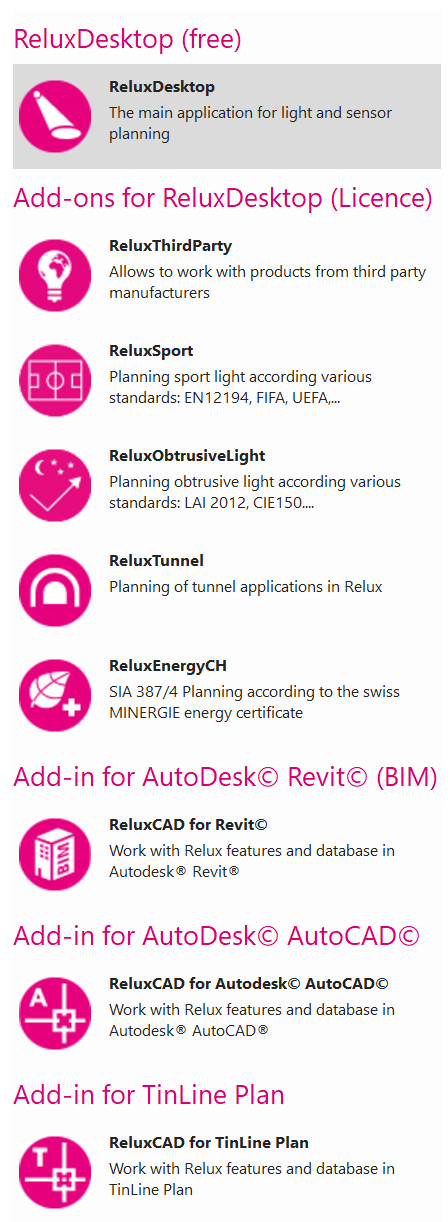
Zusätzlich können verschiedene Lizenzen erworben werden, um die Arbeitsabläufe in Kombination mit AutoCAD und Revit zu verbessern oder spezielle Lichtplanungen durchzuführen, z.B. für Tunnel.
Die Add-Ons, die auch in ReluxDesktop unter Lizenzen aufgeführt sind, sind durch CodeMeter (von Wibu-Systems) geschützt.
Beispiel
1 Einzel-Lizenz = 1 Nutzer
1 Netzwerklizenz = 1 Nutzer (temporär, kann gewechselt werden)
5 Netzwerlizenzen = 5 Nutzer (zeitgleich)
Lizenzen erwerben
Installieren Sie ReluxDesktop von unserer Website und erwerben Sie die benötigte Lizenz gemütlich in unserem Online-Shop:
relux.com/shop
Mehr Informationen zu den Produkten finden Sie auf den einzelnen Produktseiten unter "Lichtplanung".
ReluxThirdParty
Mit ReluxThirdParty können Sie Ihr gesamtes Projekt mit Produkten von Drittanbietern, d. h. von Anbietern, die keine RELUX-Mitglieder sind, direkt in ReluxDesktop zusammenstellen.
ReluxEnergyCH
Erstellen Sie das Minergie-Zertifikat gemäß der Norm SIA 387/4 (SIA 380/4) und holen Sie Ihre Baugenehmigung für energiebewusste Planung ein.
Bei der Verwendung von Produkten, die nicht von Relux-Mitgliedern stammen, ist in ReluxEnergyCH selbst kein „ReluxThirdParty“ erforderlich.
Dieses Add-on kann einmalig 30 Tage lang getestet werden.
ReluxTunnel
Erstellen Sie Tunnelberechnungen gemäß den aktuellen Normen. Anhand Ihres L20-Werts erstellt die Anwendung automatisch die Berechnungen und ordnet Ihre Leuchten zu. Schalt- und Dimmergruppen ermöglichen die entsprechenden Energiebewertungen.
Bei der Verwendung von Produkten, die nicht von Relux-Mitgliedern stammen, ist in ReluxTunnel selbst kein „ReluxThirdParty“ erforderlich.
Dieses Add-on kann gegen eine Gebühr von 500 CHF 30 Tage lang getestet werden.
Bitte wenden Sie sich an [email protected], um diese Testversion anzufordern.
ReluxObtrusiveLight
ReluxObtrusiveLight ist ein leistungsfähiges Planungstool zur umfassenden Bewertung von Lichtimmissionen in verschiedenen Anwendungsbereichen wie Sportanlagen, Straßen, Stadtentwicklungsprojekten und Außenbereichen. Dabei werden nationale und internationale Normen berücksichtigt.
Ein besonderer Vorteil der Anwendung ist die rechtzeitige Erkennung von Lichtverschmutzung, wodurch negative Auswirkungen auf die Umwelt, die Gesundheit, die Astronomie und den Energiesektor verhindert werden können.
In ReluxDesktop ist kein ReluxThirdParty erforderlich, wenn die ReluxKCalc-Lizenz durch die Verwendung eines Befehls oder Tools, das zu dieser Lizenz gehört, erkannt wurde, während andere Produkte als die der Relux-Mitglieder verwendet werden.
ReluxSport
ReluxSport ermöglicht eine professionelle, normkonforme Planung von Sportbeleuchtung. ReluxSport optimiert Ihren gesamten Planungs- und Berechnungsablauf innerhalb von ReluxDesktop. Mit normbasierten Vorlagen, automatisierten Szenen und der Ergebniserstellung in Echtzeit können Sie professionelle Projekte in Rekordzeit fertigstellen.
Bei der Verwendung von Produkten, die nicht von Relux-Mitgliedern stammen, oder von ObtrusiveLight-Funktionen ist in ReluxSport selbst kein ReluxThirdParty oder ReluxObtrusiveLight erforderlich.
Dieses Add-on kann einmalig 7 Tage lang getestet werden.
Die Testversion lässt sich in ReluxDesktop aktivieren, wenn ReluxSport zum ersten Mal gestartet wird.
ReluxCAD for AutoCAD
Dank der bidirektionalen Schnittstelle zur Relux Desktop-Anwendung erhalten Sie alle Berechnungsergebnisse in der Darstellungsform, die Sie für Ihren CAD-Plan benötigen.
In ReluxDesktop ist kein ReluxThirdParty erforderlich, wenn die ReluxCAD für AutoCAD-Lizenz durch die Verwendung eines Befehls oder Tools, das zu dieser Lizenz gehört, erkannt wurde, während andere Produkte als die der Relux-Mitglieder verwendet werden.
Dieses Add-on kann einmalig 30 Tage lang getestet werden und ist nur für die Vollversion von AutoCAD verfügbar, nicht für die LT-Version.
ReluxCAD for TinLine Plan
Erstellen Sie Ihren Beleuchtungs- und Sensorplan in TinLine Plan
In ReluxDesktop ist kein ReluxThirdParty erforderlich, wenn die Lizenz für ReluxCAD for TinLine Plan durch die Verwendung eines Befehls oder Werkzeugs, das zu dieser Lizenz gehört, erkannt wurde, während Produkte verwendet werden, die nicht von den Relux-Mitgliedern stammen.
Dieses Add-on kann einmalig 30 Tage lang getestet werden.
ReluxCAD for Revit
Direkter Zugriff auf Produkte aus dem ReluxNet®-Netzwerk mit über 100 Herstellern von Leuchten und Sensoren. Damit lässt sich die erforderliche Anzahl an Leuchten für ein Gebäude effizient und einfach ermitteln.
In ReluxDesktop ist kein ReluxThirdParty erforderlich, wenn die ReluxCAD for Revit-Lizenz durch die Verwendung eines Befehls oder Tools, das zu dieser Lizenz gehört, erkannt wurde, während andere Produkte als die der Relux-Mitglieder verwendet werden.
Dieses Add-on kann nach der Installation der Software „ReluxCAD for Revit“ von der Website 30 Tage lang getestet werden:
relux.com/downloads